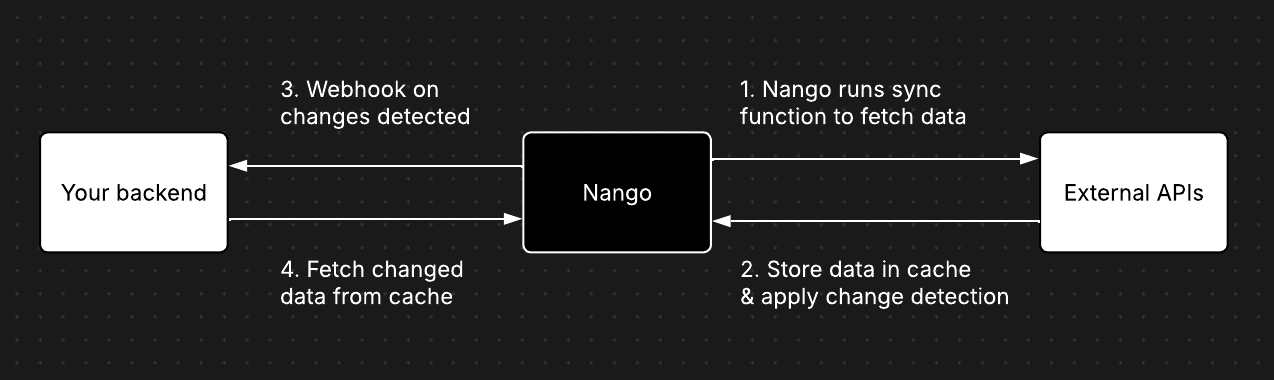
Syncs are defined on the integration (e.g., GitHub, Google Drive, etc.) by implementing a Function with the sync’s logic.Nango then executes the sync for each Connection of this integration. This lets you customize the sync’s logic, execution frequency, etc., for each customer, if necessary.Follow our implement a sync guide for step-by-step instructions to create your own syncs.
Syncs can either be incremental or full-refresh. Nango supports both and automatically detects changes to records in both modes.Incremental sync
These only fetch data that has changed since the last execution, appending it to the existing dataset. This mode is more efficient for larger datasets and relies on the external API’s support for querying modified records. Unfortunately, not all APIs and not all endpoints support this.Full refresh sync
These syncs retrieve the entire dataset during each execution. They take longer to execute, especially for large datasets. Often used as a fallback if the external API endpoint offers no way to filter or sort records by last modified date.Refer to the implement a sync guide for more information on how to implement either in Nango.
Nango supports detecting deleted records on external APIs.Deletion detection for incremental syncs requires specific support for this by the external API. For full-refresh syncs, deletes can always be detected.Follow our implementation guide for deletion detection in syncs to implement this in your own syncs.
Nango supports real-time syncs with webhooks.You can either rely entirely on webhooks for the sync or combine webhooks with polling sync runs to ensure you never miss data.Follow our implement real-time syncs with webhooks guide to add real-time support for your sync.
Nango automatically manages data retention for synced records to ensure compliance with modern data security standards:Automated payload pruning (30 days)
Records that haven’t been updated for 30 days will have their payload automatically pruned. The record metadata (including record ID and payload hash) remains intact for change detection purposes. After pruning, the record’s data fields are no longer retrievable from the Nango cache, but Nango can still track the record and detect future changes.Automated hard deletion (60 days)
If a sync hasn’t executed for 60 days, all records belonging to that sync will be permanently deleted.Best practice: Fetch records from Nango promptly after receiving webhook notifications and store them in your own system. Don’t use Nango’s cache as your primary long-term data store.Learn more about data retention policies